Support that gets things done
Customer support that refunds Stripe and Paddle from the ticket.
Refund the charge, fix the account, send the reply, without leaving the chat. Customers feel looked after. You get your time back. From $20/mo.
Free plan · Under 30 KB widget · Live in 2 minutes
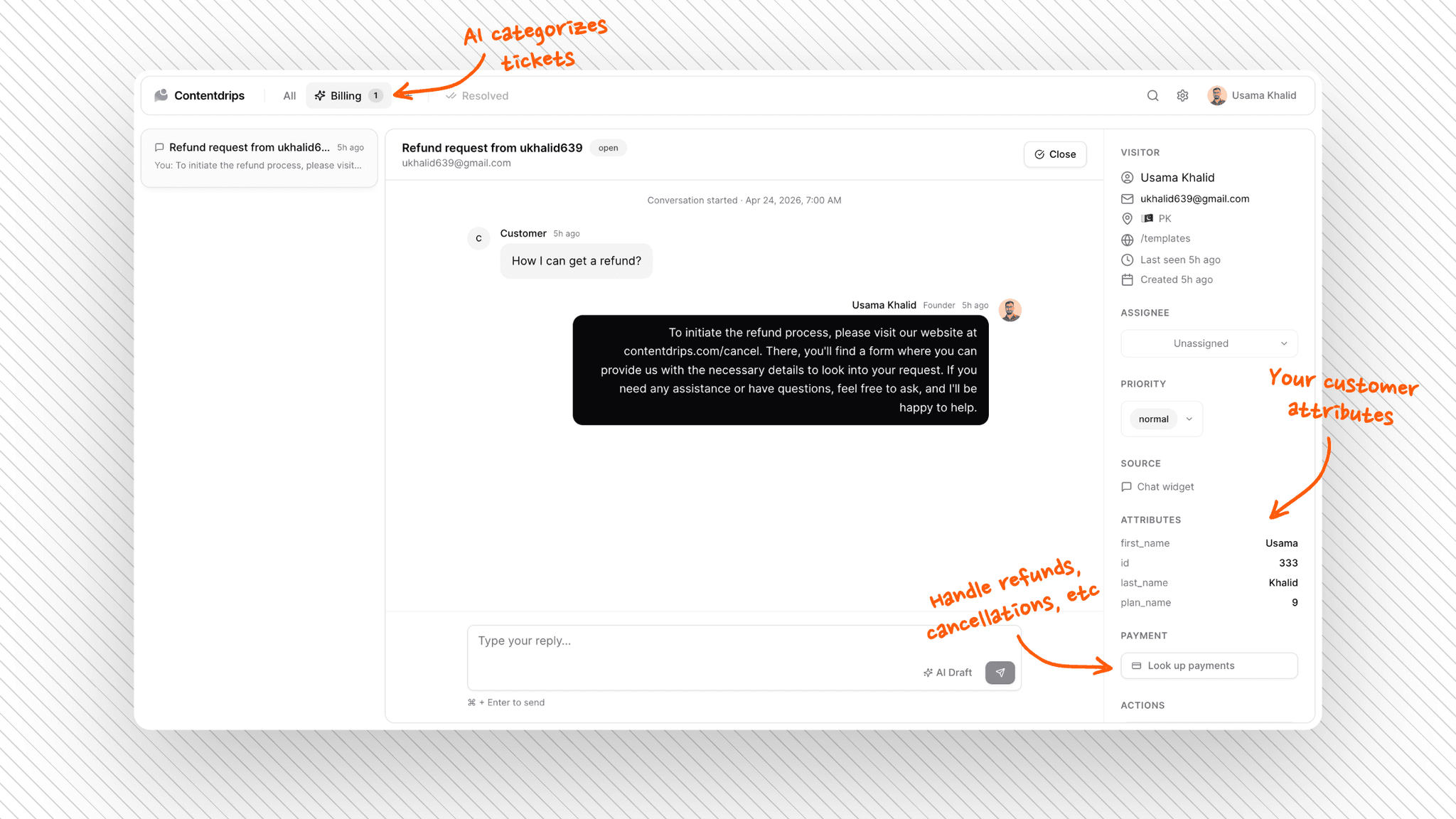
Stop hopping tabs to fix the customer.
Most helpdesks only hold the conversation. Userscom finishes the job. Money and account actions stay in the ticket.
What you stop opening
- Stripe Dashboard for every refund
- Paddle vendor panel for cancels
- Your admin app for password resets
- A second tab to look up plan/status
What stays in the ticket
- Look up · refund · cancel (Stripe/Paddle)
- Custom Actions for your own APIs
- Customer attributes on the sidebar
- AI draft reply, then send
Simple. No bloat. Fast widget. Flat pricing, so bootstrappers can actually use the powerful parts.
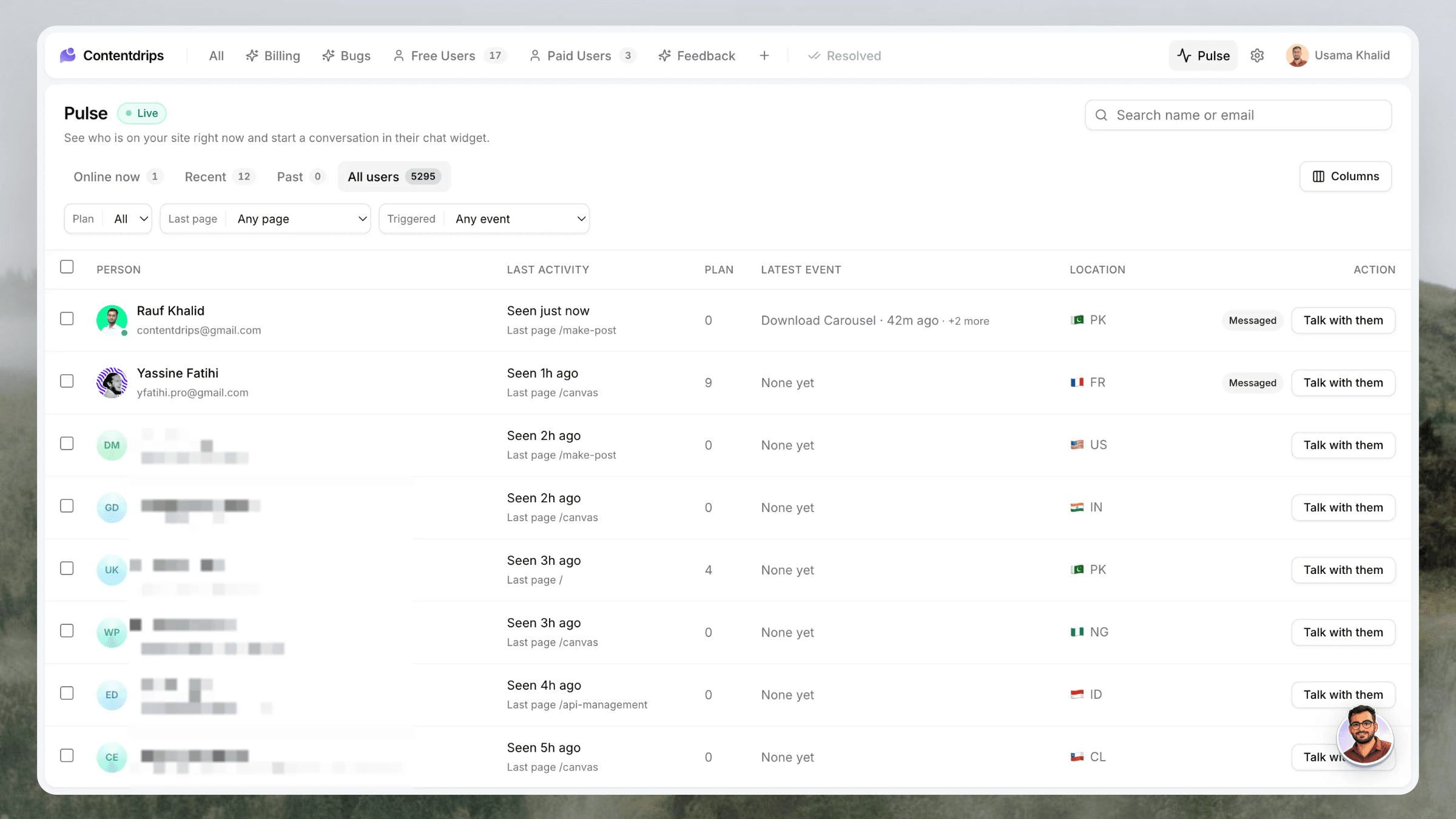
NewUserscom Pulse
See who is on your site. Talk to them before they open a ticket.
Pulse is a live list of identified customers. Who is online, what page they are on, their plan, last event, location. Then one button starts a real chat — and an optional email — in the widget they already have.
The switch reason
Chat → ticket → fix money or account → reply.
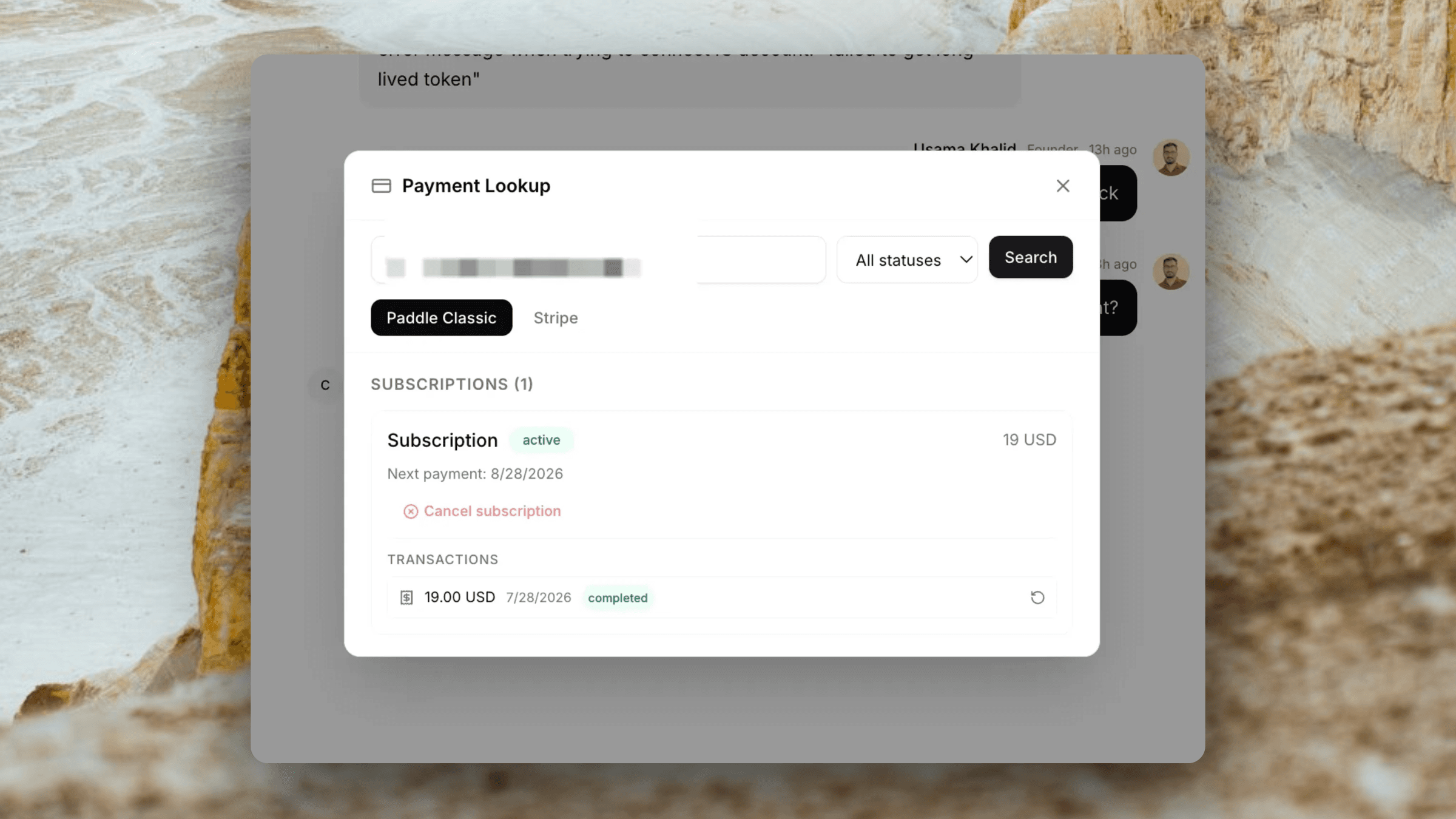
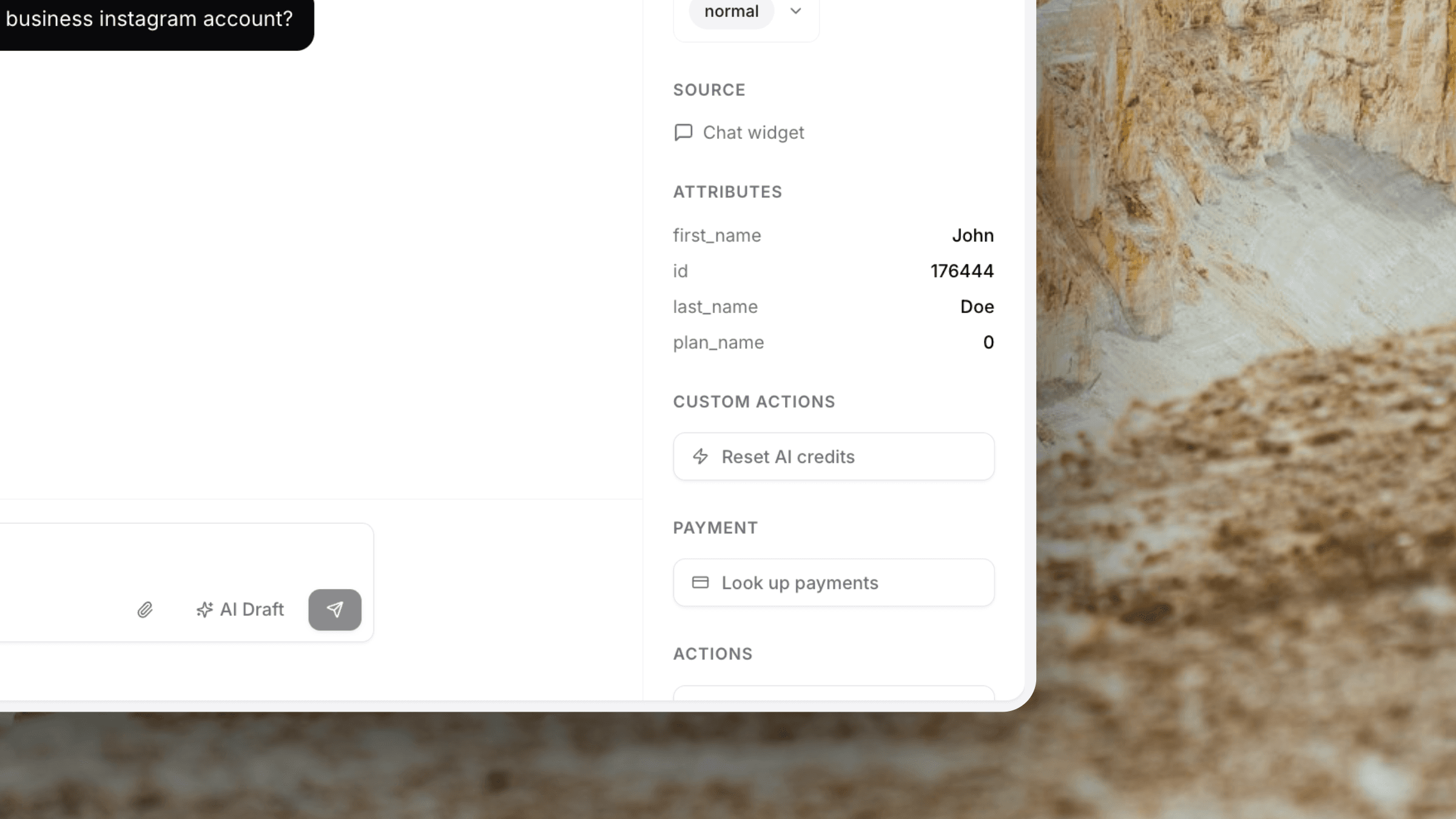
Stripe, Paddle, and Custom Actions sit next to the conversation. That is the product, not a feature buried in a grid.
Everything else stays simple.
Fast chat, AI that organises and drafts, shared inbox. No marketing suite bolted on.
Pulse
See identified people on your site and start a conversation in their chat widget before they file a ticket.
Learn moreStripe & Paddle Integration
Look up customers, view subscriptions, issue refunds, and cancel, right from the ticket. Billing + Classic.
Learn moreCustom Actions
Call your own platform APIs from the ticket sidebar: password resets, credit top-ups, account fixes.
Learn moreLive Chat Widget
Under 30 KB. Loads instantly. One script tag. Conversations become tickets.
Learn moreAI Ticket Organisation
Auto-sorted into Billing, Technical, Feedback, or tabs you define, before you open the queue.
Learn moreCustom Actions
Run your platform API from the ticket sidebar.
Wire password resets, credit top-ups, or any custom endpoint once. Agents confirm with customer data already filled from attributes. No admin-panel tab-switching.
Stripe · Paddle Billing · Paddle Classic
Refund in seconds. Without leaving the ticket.
When a customer asks for a refund or wants to cancel, open the payment panel inside the ticket. Look up their Stripe or Paddle account by email, see every subscription and charge, and act. No Stripe Dashboard or Paddle vendor panel required.
- Works with Stripe, Paddle Billing, and Paddle Classic
- View subscriptions, charges, and transactions
- Issue refunds on any charge or transaction
- Cancel subscriptions immediately
- Credentials configured once by an admin
For indie hackers & bootstrappers
You don't need an enterprise support platform. You need one that works.
Intercom starts at $74/month and assumes you have a team of 10. Zendesk needs a week to configure. Userscom is 2 minutes from sign-up to your first reply. No sales calls, no onboarding, no consultants.
Live in 2 minutes
One script tag. Your widget is live before you finish your coffee.
$20/month, not $74
Everything you actually need for a fraction of what Intercom charges. Scale up only when you need to.
AI does the sorting
Billing, technical, feedback. Tickets are categorised before you open your inbox. Less context switching.
Stripe & Paddle built-in
Handle billing support without switching tabs. Refunds and cancellations are one click away: Stripe, Paddle Billing, and Classic.
30 KB widget
Intercom's widget is 10x heavier. Yours loads fast and doesn't tank your Lighthouse scores.
No bloat
No campaigns, no product tours, no chatbot builder. Just support tools that actually support.
Email-first support
Manage support from your inbox.
No need to open Userscom for every ticket. When a visitor creates a ticket or replies, you get an email notification. Just reply to that email. Your response is automatically tracked on the ticket.
- Email notifications for new tickets
- Reply directly from Gmail, Outlook, or any email client
- Responses auto-linked to the ticket thread
- Visitors can also reply via email
- Quoted reply chains are automatically cleaned
Visitor via chat
You replied via email
Set up in under 2 minutes.
No onboarding calls. No consultants. No long setup wizards.
Add the widget to your site
Paste one script tag in your HTML. The chat widget appears on your site instantly, no build step or config required.
Identify your users (optional)
Pass user attributes like email, plan, and company so your team always knows who they are talking to.
Open your inbox and reply
Tickets arrive already sorted by AI. See customer context on the right, and reply. That is the whole workflow.
Userscom vs Intercom, Zendesk, Tawk.to and Crisp
The same core features at a fraction of the cost, with none of the complexity.
| Userscom | Intercom | Zendesk | Tawk.to | Crisp | |
|---|---|---|---|---|---|
| Starting price | $20/mo | $74/mo | $55/mo | Free* | $25/mo |
| Widget size | ~30 KB | ~300 KB | ~200 KB | ~250 KB | ~150 KB |
| Live chat widget | |||||
| AI ticket organisation | Add-on | Add-on | |||
| AI draft replies | Add-on | Add-on | Add-on | ||
| Customer attributes | Limited | ||||
| Email ticketing | |||||
| Stripe integration | |||||
| Paddle integration | |||||
| No forced branding | |||||
| Setup under 5 min |
*Tawk.to is free but shows their branding on your widget. Removing it costs an extra $19/month.
Why teams switch
The simple alternative to Intercom, Zendesk, Tawk.to, and Crisp
Same essentials. No bloat. A fraction of the price. Pick who you're leaving:
Intercom alternative
From $74/mo and a heavy widget. Userscom starts at $20 with the early-Intercom core.
Zendesk alternative
Enterprise setup and per-agent pricing. Userscom is live in minutes, flat plans.
Tawk.to alternative
Free but branded, no AI. Userscom: no forced branding, AI included, ~30 KB widget.
Crisp alternative
AI locked behind $95/mo. Userscom includes AI drafts & organisation from $20.
Simple pricing. No surprises.
No per-seat fees. No feature add-ons. One flat price, everything included.
Free
Kick the tyres, no card needed.
- 20 conversations / mo
- 1 team member
- 1 AI-organised tab
- Live chat widget
Starter
For small teams getting traction.
- 500 conversations / mo
- 2 team members
- 3 AI-organised tabs
- 2 Custom Actions
- AI draft replies
- Email ticketing
Advance
For teams handling real volume.
- 2,000 conversations / mo
- 5 team members
- 10 AI-organised tabs
- 6 Custom Actions
- Custom widget branding
Pro
No limits, no compromises.
- Unlimited conversations
- Unlimited team members
- Unlimited AI tabs
- 20 Custom Actions
- API access
- Dedicated support
All plans include a 14-day free trial. No credit card required to start.
Frequently asked questions
Pulse is a live list of identified visitors on your site. You see who is online, what page they are on, their plan and events, then message them in the chat widget — optionally by email. It is included on Advance and Pro.
Intercom and Zendesk are enterprise platforms with hundreds of features, steep pricing, and long onboarding processes. Userscom focuses on the essentials: live chat, ticket organisation, customer context, and team inbox. You can be live in 2 minutes, and pricing starts at $20/month.
When a new ticket arrives, our AI reads the message content and automatically routes it to the right category tab: Billing, Technical Support, or Feedback. You can create custom tabs with rules written in plain English. Your inbox is already organised every time you open it.
Yes. Use Userscom.identify() to pass any attributes: email, name, plan, company, signup date, or anything custom. These attributes appear alongside every ticket so your team always has context before they reply.
About 2 minutes. Paste one script tag on your site and the widget is live immediately. User identification is one additional JavaScript call.
Yes. The free plan includes 20 conversations per month, 1 team member, 1 AI-organised tab, and the live chat widget with no forced branding. No credit card required.
A conversation is a single support thread, whether it started via live chat or email. Multiple back-and-forth replies within the same thread count as one conversation.
Yes. When a new ticket arrives or a visitor replies, you'll receive an email notification. Simply reply to that email. Your response is automatically tracked on the ticket. Visitors can also reply via email. The entire conversation stays in sync.
Yes. Get in touch and we'll help you migrate your ticket history. Most migrations are complete within a day.
No. The Userscom widget is under 30 KB, roughly 10x smaller than Intercom and 8x smaller than Zendesk. It loads asynchronously and has no measurable impact on your Core Web Vitals.
Userscom integrates with Stripe, Paddle Billing (v2), and Paddle Classic (the legacy vendor API). You can connect any combination. When a billing ticket arrives, open the payment panel, look up the customer by email, and issue refunds or cancel subscriptions without opening the Stripe Dashboard or Paddle vendor panel.
Stop paying for features you don't need.
Support without the tab-switching. Refund, run a Custom Action, reply, then get back to building. Start free today.
Free plan forever · No credit card · Cancel anytime