Zendesk Alternative
The Zendesk Alternative That Doesn't Need an Administrator
Zendesk is the gold standard for enterprise support operations. But if you're a small or growing team, configuring triggers, automations, and SLA policies takes longer than actually helping customers. Userscom gets you live in 2 minutes, with AI that organises your tickets automatically. No Zendesk admin certification required.
Free plan available · No credit card · 2-minute setup
Zendesk homepage · visit site
Intercom vs Zendesk for startups · Best helpdesk for micro-SaaS · Freshdesk alternative · Help Scout alternative
Why teams look for a Zendesk alternative
Zendesk is purpose-built for large enterprise support teams with dedicated support operations managers, complex escalation workflows, and hundreds of agents. The platform reflects that. It has triggers, automations, business rules, SLA policies, macros, views, and a whole ecosystem of configuration options that need to be set up before it actually works well.
For smaller teams, that configuration overhead is a real cost. Many businesses spend their first weeks just setting up Zendesk rather than actually supporting customers. The UI is dense, onboarding is complex, and the pricing at $55/month per agent adds up fast once you have more than one or two people on your support team.
Zendesk also launched its AI add-ons as a separate premium tier, meaning you pay extra for features like ticket summarisation and intelligent triage on top of an already high per-agent base cost.
Common Zendesk frustrations
- Per-agent pricing at $55+/mo per seat
- Complex setup requiring an admin
- Steep learning curve for new team members
- AI features cost extra on top
- UI built for large enterprise teams
- Weeks of configuration before it's usable
What you get with Userscom
- Flat per-plan pricing from $20/mo
- No admin needed — live in 2 minutes
- Any team member learns it immediately
- AI ticket sorting and drafts included
- Clean UI built for fast replies
- Add team members without bill shock
Userscom vs Zendesk side by side
The features that matter for a small or growing support team.
| Userscom | Zendesk | |
|---|---|---|
| Starting price | $20/mo flat | $55/mo per agent |
| AI ticket organisation | Add-on | |
| AI draft replies | Add-on | |
| Live chat widget | ||
| Widget size | ~30 KB | ~200 KB |
| Customer attributes | ||
| Shared team inbox | ||
| Setup time | < 2 min | Hours to weeks |
| No admin required | ||
| Free plan |
Simple support tools. Powerful where it counts.
Live Chat Widget
Fast, customisable, under 30 KB. Loads instantly on any website. Single script tag to install.
AI Ticket Organisation
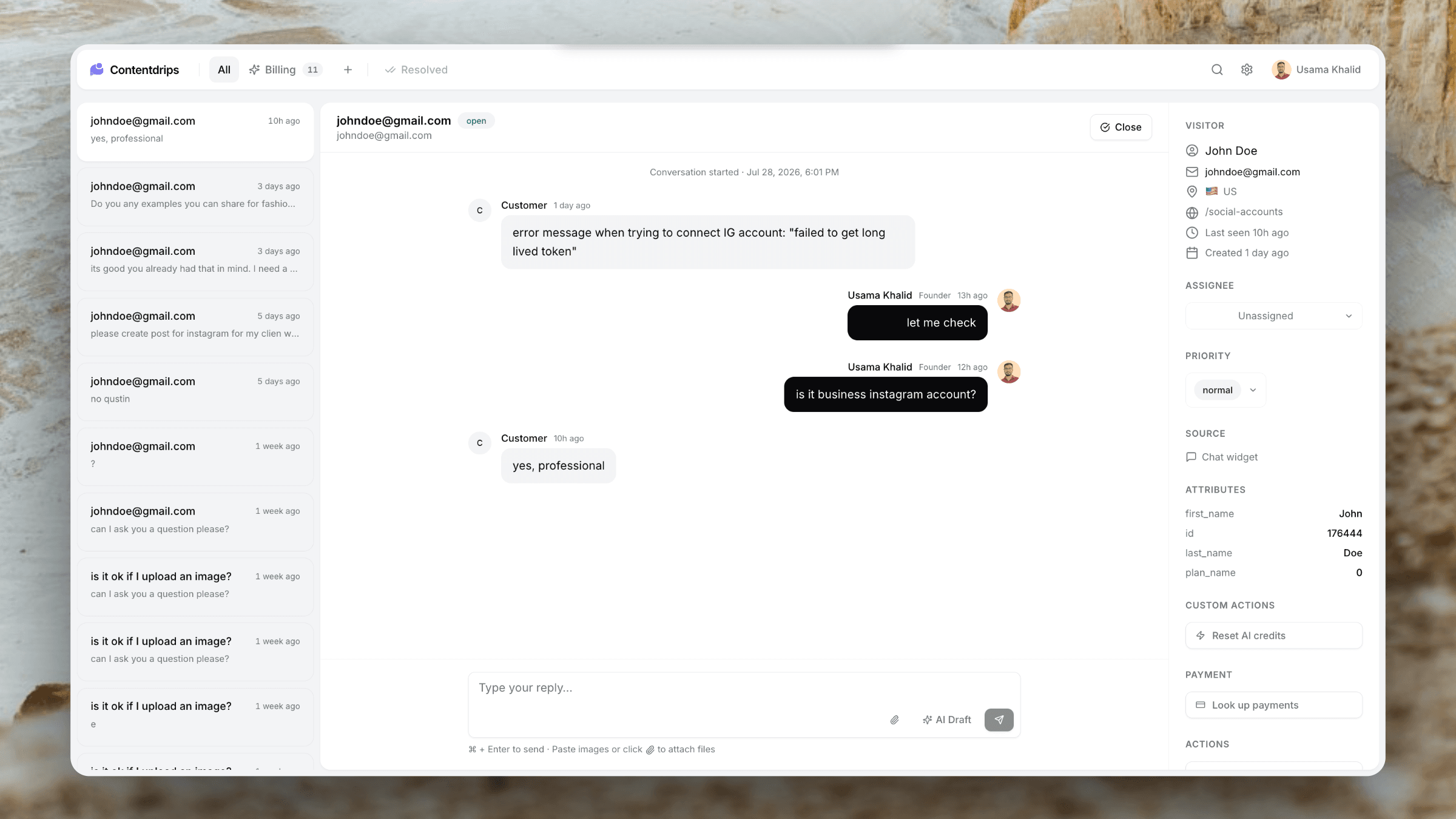
Tickets are automatically sorted into categories the moment they arrive — no manual triage needed.
Customer Context
See user plan, company, and custom attributes next to every ticket. Respond with context, not guesses.
Team Inbox
Shared inbox with assignment. Add teammates without per-seat billing surprises.
AI Draft Replies
One-click AI drafts based on the conversation. Cut reply time significantly.
Email + Chat in One Place
Support email creates tickets. Customers reply how they want. It all lands in one inbox.
Flat pricing. Not per-agent.
Zendesk charges per agent per month. A 5-person support team costs $275+/month before you add any AI features. Userscom charges per plan — our Advance plan supports 5 team members for $40/month total.
Advance
- 2,000 conversations/mo
- 5 team members
- 10 AI tabs
- Custom branding
Common questions about switching from Zendesk
Yes. For small teams the most important features are: a way for customers to contact you, a shared inbox so the team can respond, customer context alongside tickets, and some form of organisation. Userscom covers all of that. What it doesn't have is Zendesk's advanced workflow automation, SLA management, and enterprise reporting — features most small teams don't use anyway.
Userscom uses AI to categorise tickets automatically. When a ticket arrives, the AI reads the message and routes it to the right tab — Billing, Technical, Feedback, or custom categories you define in plain English. You don't need to set up trigger conditions or routing rules.
Zendesk lets you export your ticket data in JSON or CSV format. Contact us and we'll help you import that history into Userscom. Most migrations are complete within a day.
Zendesk Suite Team starts at $55/agent/month — so $165/month for 3 people. Userscom's Advance plan is $40/month for up to 5 people. That's a saving of $125/month, or $1,500/year.
Yes. You get a support email address (or you can forward your existing one) and all emails become tickets in your Userscom inbox. Customers reply by email and the thread stays connected. It works the same way Zendesk's email channel does.
Yes. The free plan includes 20 conversations per month, 1 team member, 1 AI-organised tab, and the live chat widget. No credit card needed.
Support software that doesn't need an admin.
Switch from Zendesk to Userscom. You'll be live in 2 minutes and your team will thank you for it.
Free plan forever · No credit card · Cancel anytime