Paddle support for merchants · Billing & Classic
Paddle support that handles buyer lookups, refunds & cancellations from your inbox.
Searching for Paddle buyer support that isn't paddle.com's own help desk? Userscom is merchant-side Paddle support software. Connect Paddle Billing or Classic, then look up customers, issue refunds, and cancel subscriptions inside the ticket — no dashboard tab-switching.
Free plan available · 2-minute setup · No credit card
The workflow
From "I want a refund" to refund issued — in one tab.
Before Userscom, you'd open the ticket, then open Paddle, search for the customer, find the transaction, click refund, come back. Now that whole thing happens inside the ticket.
Customer opens a billing ticket
A customer messages about a charge or wants to cancel. Their ticket lands in your Billing tab, already sorted by AI.
Open the payment panel
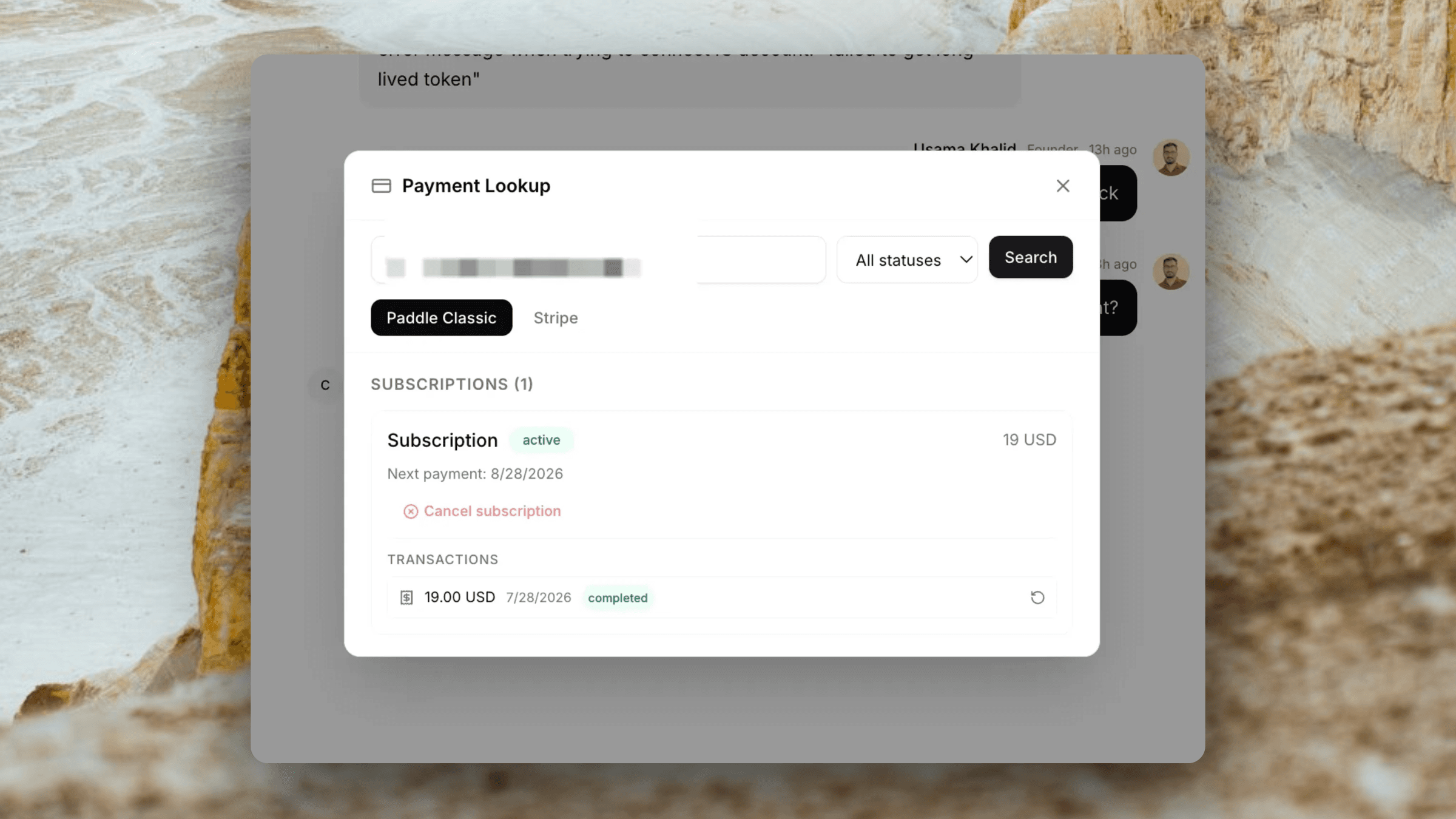
Click the payment icon inside the ticket. Look up their Paddle account by email — subscriptions, transactions, and status appear instantly.
Act without switching tabs
Issue a refund or cancel the subscription from the panel. Confirm with one click. You never touch the Paddle dashboard.
Capabilities
Everything you need to handle billing support fast.
Customer lookup by email
Type the customer email inside any ticket and instantly pull their Paddle account — name, subscription plan, billing status, and payment history.
View subscriptions & transactions
See all subscriptions (active, paused, cancelled, past due) and individual transactions with amounts and dates — without logging into Paddle.
Issue refunds in one click
Select any transaction and issue a full refund from inside the ticket. Works with both Paddle Billing and Paddle Classic.
Cancel subscriptions
Cancel a customer's subscription directly from the ticket panel. No need to find them in the Paddle dashboard separately.
Filter by subscription status
Filter by active, past due, trialing, paused, or deleted (Classic) / canceled (Billing) so you can find the right subscription quickly.
Admin-only credentials
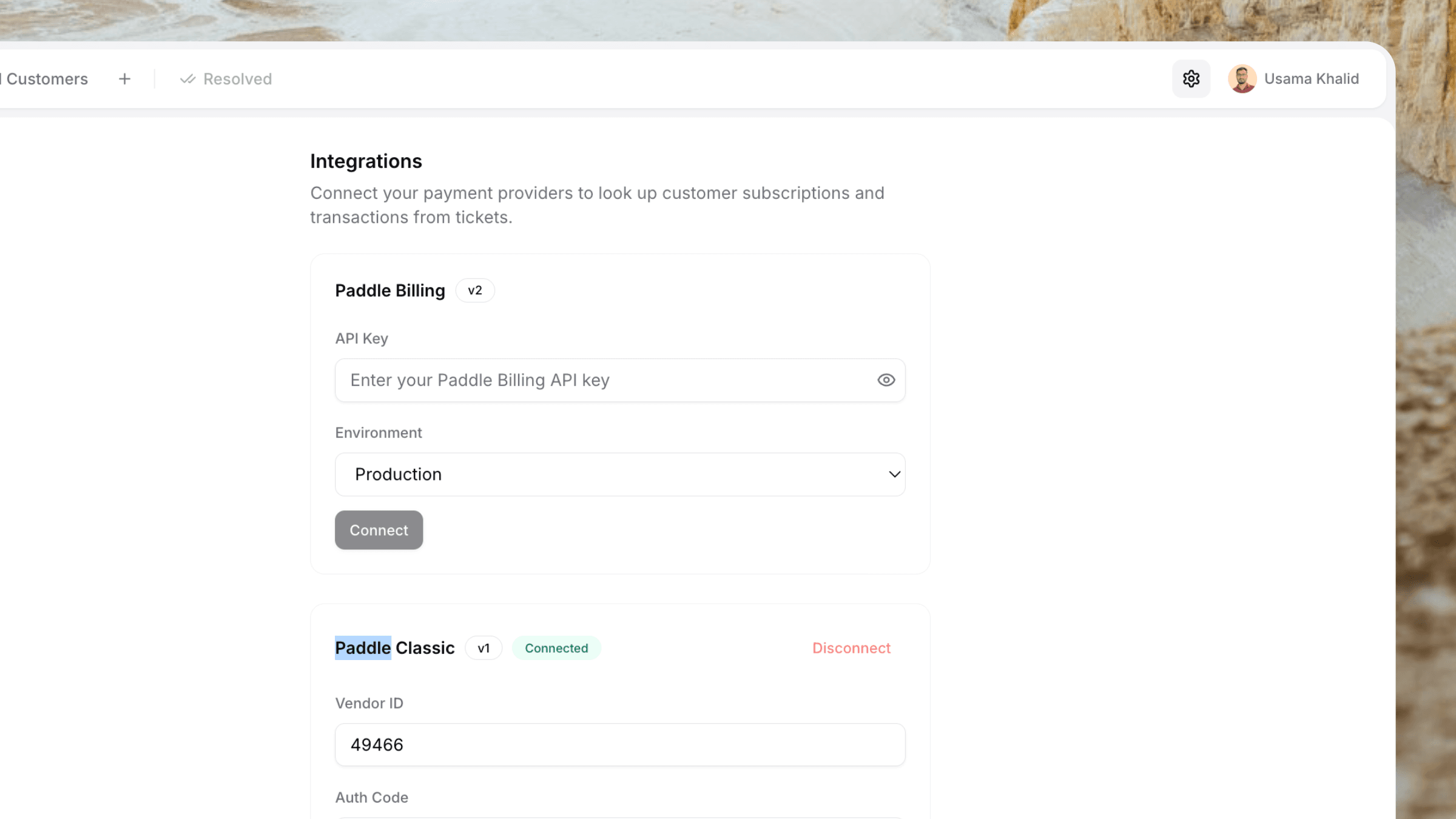
Paddle API keys are stored securely and configured once by an admin. Agents can use the panel without individual Paddle access.
Both APIs supported
Paddle Billing and Paddle Classic
Whether you're on the modern Paddle Billing API or still running on Paddle Classic, Userscom handles both. Switch between them inside the same ticket panel.
Paddle Billing
- Customer lookup via Paddle Billing v2 API
- View subscriptions with full status (active, canceled, paused, trialing)
- View transaction history per customer
- Issue full refunds on any transaction
- Cancel subscriptions at end of billing period
- Supports production and sandbox environments
Paddle Classic
- Customer lookup via Paddle Classic vendor API
- View subscriptions with status filter (active, past due, paused, deleted)
- Paginated subscription search — finds customers in large catalogues
- View per-subscription transaction history
- Issue refunds via order ID
- Cancel subscriptions immediately
Built for indie hackers
You're probably the only support person. That's the point.
When you're a solo founder using Paddle to sell your SaaS, every billing ticket is a context-switch: support tool, Paddle dashboard, maybe Stripe, back to support. Userscom cuts that to one tab. Handle the ticket, look up the Paddle account, issue the refund, close the ticket — done.
Faster resolution
Stop bouncing between tabs. Everything you need to resolve a billing ticket is on one screen.
Less mental overhead
No remembering which dashboard is for what. Open the ticket, open the payment panel, act.
$20/month, not $74
You don't need an enterprise support platform. Userscom gives you what Intercom costs 9x more for.
Plus everything else
Paddle is one part of a complete support stack.
The Paddle integration sits inside a full customer support product — live chat, AI, and shared inbox included.
Live Chat Widget
~30 KB widget. One script tag. Loads instantly on any site.
AI Ticket Sorting
Billing tickets auto-route to your Billing tab before you open them.
AI Draft Replies
AI reads the ticket and writes a reply. Edit if needed, send in one click.
Stripe Integration
Same workflow for Stripe merchants — lookups, refunds, cancels in-ticket.
Customer Context
Pass plan, company, custom attributes — visible on every ticket.
2-Minute Setup
One script tag. One API key. You're live.
Switching from another tool? Intercom, Zendesk, Crisp, or Tawk.to alternatives — plus best live chat for Paddle merchants.
Frequently asked questions
No. paddle.com support is for end customers contacting Paddle. Userscom is for Paddle merchants who need to handle their own customer tickets — lookups, refunds, and cancellations — without leaving their helpdesk.
Yes. Userscom connects to both Paddle Billing (the modern v2 API) and Paddle Classic (the legacy vendor API). You can have both active at the same time and switch between them inside the ticket panel.
No. Once your Paddle credentials are saved, the payment panel appears inside every support ticket. You look up the customer, see their subscriptions and transactions, and trigger a refund or cancellation — all without opening the Paddle dashboard.
You can look up a customer by email, view all their active and past subscriptions, view individual transactions, issue a refund on any transaction, and cancel a subscription. Both Paddle Billing and Paddle Classic actions are supported.
Yes. Credentials are stored encrypted per organisation and are never exposed in the frontend. Only workspace admins and owners can add or remove Paddle credentials.
Yes. When looking up a customer, you can filter by subscription status — active, past due, trialing, paused, or deleted (Classic) / canceled (Billing). Useful when a customer contacts you about a subscription that already ended.
No. The integration is configured once by an admin using your existing Paddle API key. All team members can then use the payment panel in tickets without any individual Paddle credentials.
Set up Paddle support in under 5 minutes.
Connect your Paddle account, install the widget, and start handling billing tickets without leaving your inbox.
Free plan forever · No credit card · Works with Paddle Billing & Classic