AI · Ticket organisation · Tabs
Your inbox, already sorted.
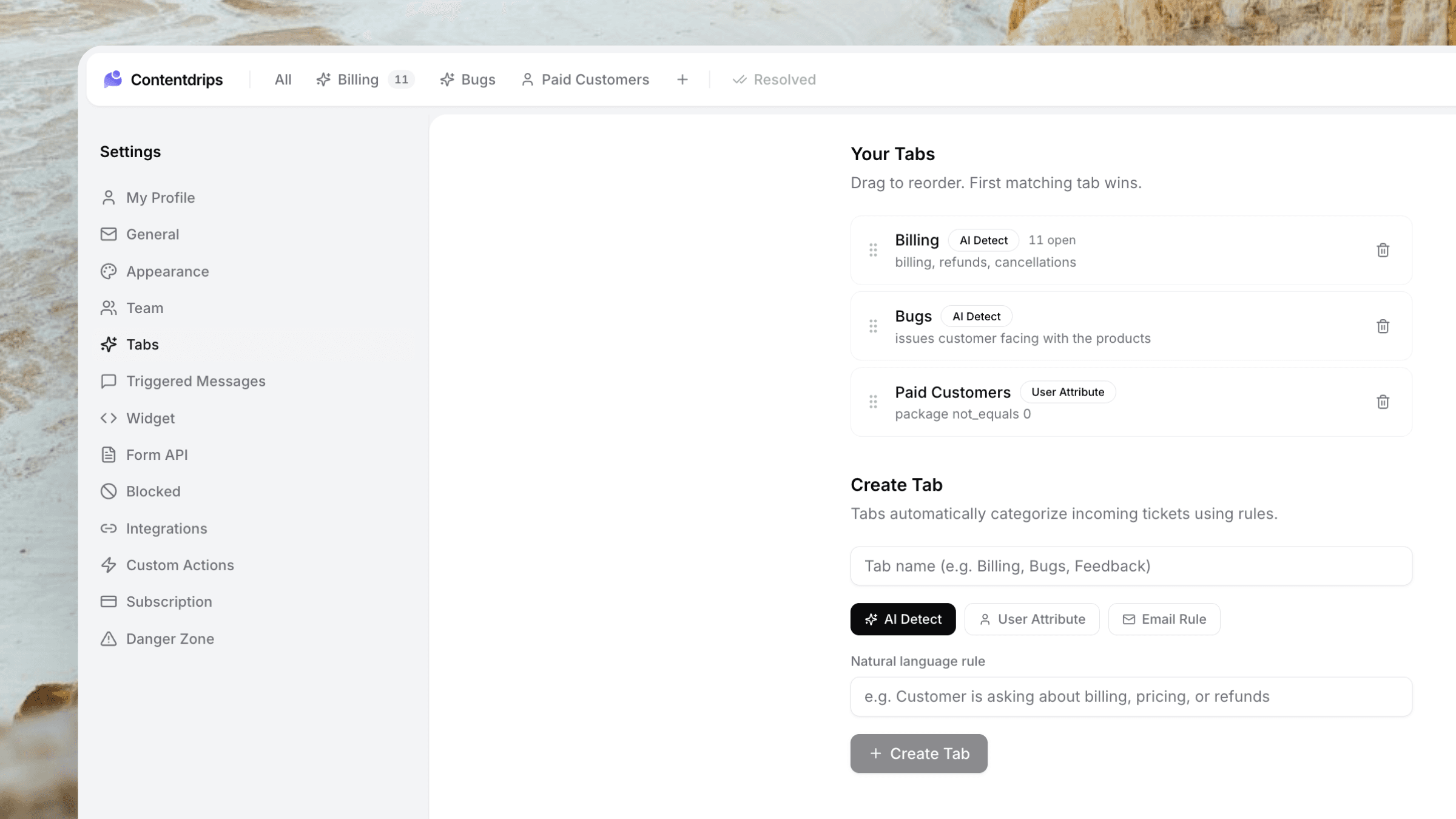
When a ticket arrives, AI reads the message and routes it to the right tab — Billing, Technical, Feedback, or rules you write in plain English. No tagging. No manual sorting.
Included from Starter · No separate AI plan
The workflow
From chaotic inbox to clear tabs — automatically.
Chat, email, and form tickets all get the same AI routing the moment they land.
A ticket arrives
Customer chats, emails, or submits a form. Userscom creates a ticket with full message context.
AI reads and routes
The model classifies intent and assigns a tab — built-in categories or your custom rules.
You open a clean inbox
Jump straight to Billing or Technical. Assign, draft, and resolve without digging through noise.
Capabilities
Organisation that runs 24/7.
Built-in tabs
Start with sensible defaults for Billing, Technical, and Feedback — then customise freely.
Plain-English rules
Create tabs like “tickets mentioning refund or chargeback” without learning a query language.
Every channel sorted
Chat, email, and form submissions get the same AI organisation — one inbox model.
No AI upsell
Ticket organisation is included from the Starter plan at $20/mo. Not a $50–100 add-on.
Attribute rules too
Route by customer attributes (plan, company, etc.) as well as message content.
Email rules
Match on subject, from, or body so VIP domains and known patterns land in the right place.
Use cases
Stop sorting. Start resolving.
Great for
- Solo founders drowning in mixed tickets
- Teams splitting billing vs technical work
- High-volume days when triage is the bottleneck
- Form + chat + email in one product
- Custom categories unique to your SaaS
- Keeping refunds out of the general pile
What you configure
- AI-detect tabs with a short prompt
- User-attribute tabs (e.g. plan equals Pro)
- Email-field rules (subject contains…)
- Tab order that matches your workflow
- Open counts per tab in the sidebar
- Works the moment a ticket is created
Plus everything else
Sorting pairs perfectly with drafts and actions.
Frequently asked questions
When a ticket is created, Userscom reads the message (and can use attributes or email rules) and assigns it to a tab. You see an organised inbox instead of one undifferentiated pile.
Yes. Create AI-detect tabs with plain-English prompts, user-attribute tabs, or email-field rules. Reorder tabs to match how your team works.
No. AI ticket organisation is included from the Starter plan at $20/month. Many competitors charge separately for AI features.
Yes. Chat, email, and form submissions all become tickets and go through the same organisation pipeline.
You can still work the ticket normally and refine tab rules over time. Organisation is there to save triage time, not lock you into a wrong category.
Open an inbox that sorts itself.
Start free, turn on tabs, and let AI handle triage while you handle customers.
AI organisation from Starter · Free plan to try the product